Simple, fast, and secure PDF tools designed for real-world use — no accounts, no clutter, no nonsense.
Fast In-Browser Processing
Most small to medium PDF files are processed in seconds directly in your browser. No waiting queues. No server delays. Just upload and go.
Completely Free to Use
No subscriptions. No trial limitations. No hidden paywalls for basic PDF tasks like merging, splitting, or converting files.
No Watermarks, Ever
Your documents stay clean and professional. We do not add branding, stamps, or hidden marks to your files.
Works on Any Device
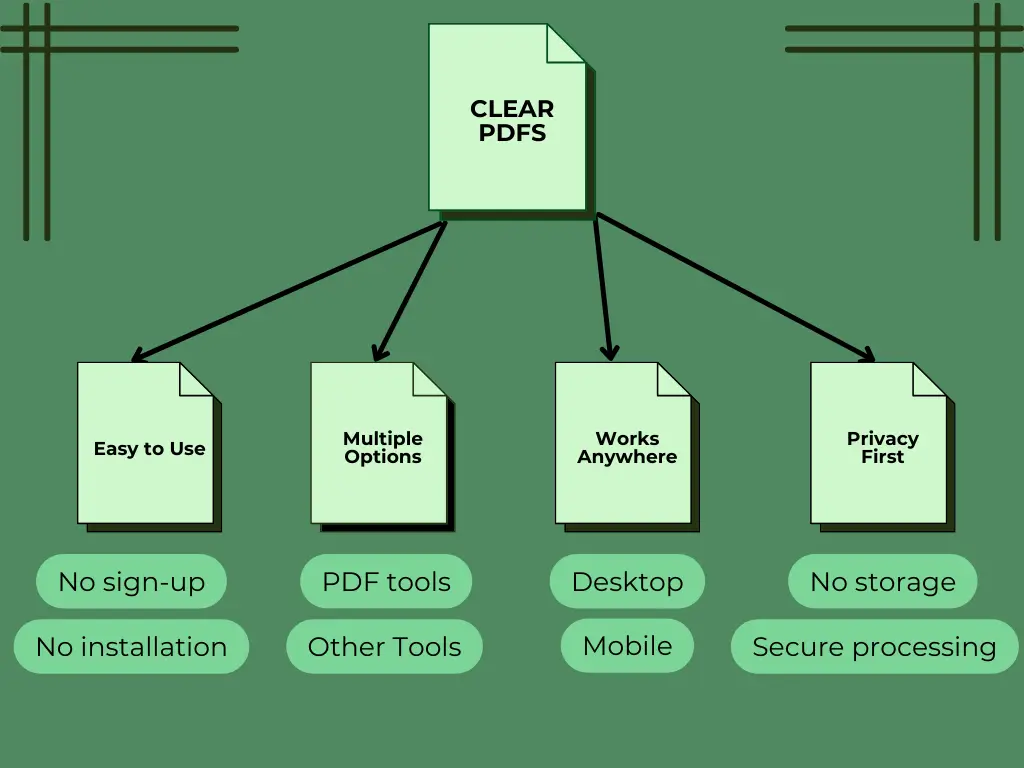
ClearPDFs runs smoothly on desktop, tablet, and mobile devices. All tools are optimized for responsive, touch-friendly use.
No Installation Required
Everything runs directly in your browser. No software downloads. No plugins. No unnecessary extensions.
Privacy-Focused Design
Many tools process files locally in your browser, reducing external file storage and improving data control.
Free Online PDF & Text Tools
ClearPDFs gives students, creators, and businesses a fast, private toolkit for everyday document and text tasks. No sign‑ups, no watermarks – just simple, effective tools that run entirely in your browser. Whether you need to merge PDFs, count words, or generate SEO slugs, everything happens instantly and securely.
Our mission is to remove friction: you shouldn’t have to install software or worry about privacy when you just want to split a PDF. All tools are optimized for speed and clarity, with a clean interface that works on any screen.
Who Is This For?
Students
Merge lecture notes, convert papers, and count words – all free, no login.
Content Creators
Generate slugs, compress PDFs for uploads, and extract text quickly.
Businesses
Handle contracts, split large PDFs, and keep sensitive data local.
Frequently Asked Questions
Yes, ClearPDFs is 100% free to use. All tools, including PDF merging, splitting, converting, and text utilities, are available without any hidden fees, subscriptions, or usage limits.
Yes. Your files are processed directly in your browser whenever possible, which means they are not uploaded to external servers. This ensures better privacy and security for your documents.
No, you don’t need to sign up or create an account. You can use all tools instantly without registration.
Yes, ClearPDFs is fully responsive and works on smartphones, tablets, and desktops. All tools are optimized for mobile use.
No. ClearPDFs does not add any watermarks or branding to your files, so your documents stay clean and professional.
No installation is required. All tools run directly in your browser, so you can start using them instantly.